[Project] Vision-UI
A brief write-up on the architecture and decisions behind Vision UI.
Vision-UI
Introduction
On most small embedded displays I’ve worked with, the hardware is fast enough, but the motion still doesn’t feel right. Animations often look choppy or patched together.
I wanted to see whether a basic MCU — for example, an STM32F1 driving a 128×64 display — could produce motion that feels more natural while staying lightweight enough for small devices.
This eventually became Vision UI. But the goal wasn’t to “build a UI framework.” It was mainly an attempt to understand what makes smooth motion and consistent visual behavior possible on tiny hardware.
On small devices, smoothness doesn’t come for free. Every animation curve, frame, and pixel shift has to contend with timing jitter, limited RAM, SPI bandwidth, and a strict per-frame time budget. Vision UI is just the structure that formed while working through those constraints.
Positioning
Where Vision UI sits among existing embedded UI options
| Dimension | Vision UI | u8g2 + manual | LVGL |
|---|---|---|---|
| Displays | Small mono/TFT | Mono/basic TFT | Color + touch |
| Goal | Smooth motion | Minimal draw logic | Full GUI stack |
| Abstraction | Medium | Low | High |
| Animation | 2nd-order ODE | None/ad-hoc | Built-in |
| Memory | Low, predictable | Very low | High |
| Widgets | Lists/icons | Custom | Rich |
| Code growth | Centralized | Scattered | Centralized/config-heavy |
| Portability | HAL + PC sim | Project-specific | Ecosystem |
| Learning curve | Medium | Low | High |
| Best for | Small smooth UIs | Simple menus | Complex HMI |
Note
Vision UI fills a specific gap between “handwritten drawing code” and “full GUI stacks”:
- If you only need a couple of static menus, handwritten u8g2 code is often enough.
- For complex touch interfaces, LVGL is the obvious choice.
- Vision UI lives in between: small OLED/TFT screens that mainly show lists or simple layouts, but still benefit from consistent, smooth motion, and swift development.
System Design
The constraints that shaped the design were straightforward:
- ~64 KB usable RAM
- 128×64 / 240×240 displays with partial/full buffers
- SPI/I2C bandwidth ceilings
- Unstable tick timing on MCU boards
- ~3–4 ms per frame
- Font rendering cost and limited caching

The constraints drove most of the decisions. The framework grew as I worked through the hardware limits, rather than from a big upfront design.
Animation
Easing curves often look fine on isolated transitions, but they fall apart once you interrupt them.
Velocity doesn’t carry over, motions don’t combine well, and the transitions feel arbitrary.
A second-order ODE works better in this environment:
- continuous velocity
- natural-looking acceleration
- smooth interruption behavior
- single-parameter responsiveness
- intuitive to tune
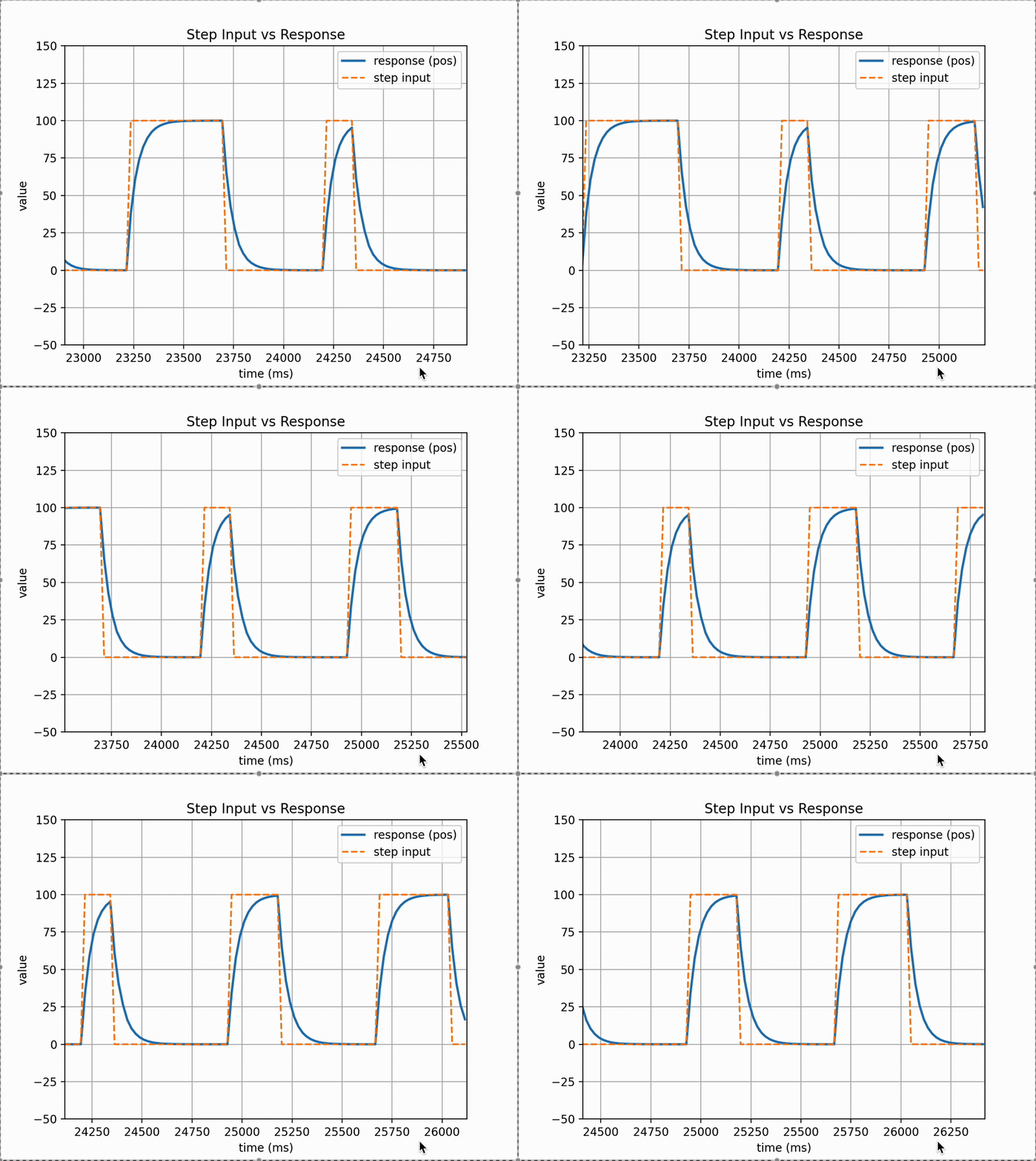

Interrupting animations and handling unstable dt required a few fixes (clamping, integration limits, etc.), but once stable, the ODE motion system made the rest of the UI logic much simpler.
Challenges
A few issues took more time than expected:
- Keeping animation stable under variable frame times
- Making the motion system interrupt-friendly without breaking state
- Tuning motion parameters for responsiveness without losing natural behavior
- Keeping layout and animation logic consistent across driver backends
- Balancing smooth motion against a tight per-frame time budget
Performance
On a 240x240 OLED, Vision UI reaches around 220 FPS with the motion system active. CPU usage stays under ~30% in my tests (at a fixed 80 FPS).
Conclusion
Working on this made me realize how little room small systems give you. You end up keeping only what’s necessary.
If I were starting over, I’d probably build the motion system first, since it influences most of the other pieces.
I’m already using Vision UI in a few side projects, and I’ll keep adjusting it as new use cases show up.
Tip
I’ll keep adding details as the project moves forward. If you’d like to follow along, you can find my Reddit and YouTube links underRelevant Linksin the left menu.